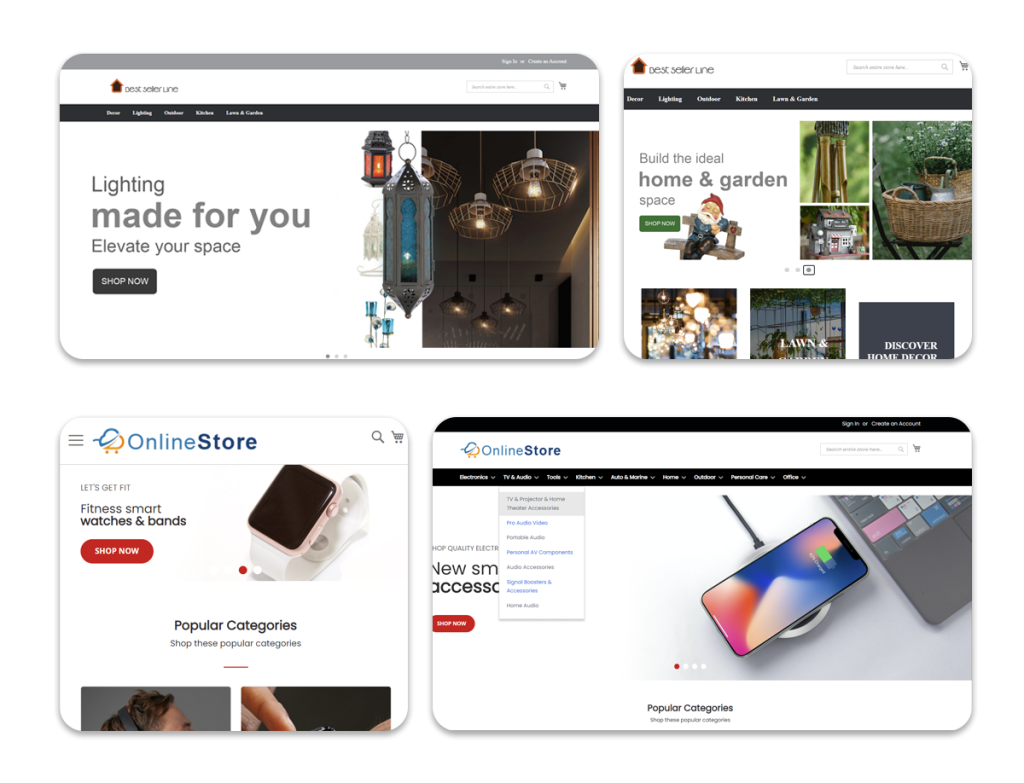
eMerchantClub is currently in the process of upgrading all Version 10 websites to the new Version 10.1. This latest version offers additional enhancements to your Version 10 website which will increase the ease of use of your site for you and your shoppers as well as offer you additional functionality.
Version 10.1 offers three new holiday themes added in time to prepare for the holiday season. These Christmas, Thanksgiving and Holiday themes will be available for all Version 10 layouts, which include layouts 86 through 95. These themes offer you further flexibility for your website’s style and color and help to give your shoppers the impression that your site is current and updated on a timely basis.
Version 10.1 also offers improved code to keep up with changing PCI compliance standards. The Payment Card Industry Data Security Standard is an international security standard assembled by the Payment Card Industry Security Standards Council. PCI compliance has come to be known as an industry standard stamp of approval for e-commerce websites. Maintaining this standard of security is extremely important to us, and a big part of our year-round sub-releases is focused on updating your website’s code to be in line with these strict and constantly changing security guidelines. Your Version 10.1 eCommerce website is updated with the latest standards and you can be sure that we are constantly working to keep your site in line with PCI compliance standards with each new release.
10.1 also offers a new product sorting option on the product pages of the storefront. This new enhancement offers your shoppers a more efficient, easier to use, and more attractive way of sorting the products on the storefront. Shoppers can sort products by item number low to high, item number high to low, item name, prices low to high, prices high to low, in stock or out of stock.
This enhancement is sure to make your shoppers’ experience better and improve the ease of use of your website in the hopes of increasing the shoppers’ ability to find the items they are looking for.
In addition to this new product sorting option, version 10.1 also offers a brand new pagination option which will appear on the storefront on pages where more than one page of products is listed.
In order to activate this new pagination option on your storefront, go to Appearance > Customize Storefront > Pagination Options and choose the third option.
After choosing this option, the new style will appear on your storefront. If the new pagination does not look similar to the below image, then you may need to get the newest styles for your site by either re-applying your layout or by going to Appearance > Style and Color > Update Styles and Images.

This new style is visually appealing and adds a further touch of professionalism to your site.
Improvements have also been made to the checkout process to make it easier for your shoppers to check out. These improvements allow your shoppers to proceed to checkout faster when only one payment option is enabled. Also, an enhanced checkout button has been added to the basket page to increase visibility and make it easier for shoppers to proceed to checkout.
These are a few of the enhancements and improvements that have been made to your site. In addition to these, several more improvements have been made to clean up the code of your site and enhance the performance.
If your site does not include some of the mentioned features, give us a call at (888) 806-2081 for information on getting these features.
As always, if you have any questions please contact Technical Support via e-mail at techsupport@emerchantclub.com by going to Live Chat Technical Support at http://www.emerchantclub.com/support.html or by calling (877) 384-4691.
Thank you,
Your eMerchantClub Team
eMerchantClub LLC
996 Flower Glen Street
Simi Valley , CA 93065
(877) 384-4691 Phone
(888) 201-2680 Fax
Click here to view previous newsletter articles